Actalle: A Script Font for Web Design
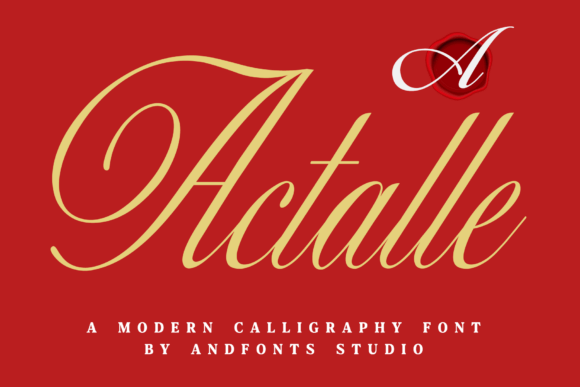
As a web designer, I’m always on the lookout for fonts that bring personality to a site without sacrificing readability. Actalle has quickly become one of my go-to choices for headers and display elements. It’s a script font with a modern edge, blending the elegance of traditional calligraphy with a clean, contemporary feel.
Actalle in Action: A Hero Section Test
I recently tested Actalle in a hero section for a boutique online store. The font stood out against a bold background image, adding a touch of sophistication without overwhelming the design. Its fluid strokes gave the text a natural, handcrafted look that aligned perfectly with the brand’s aesthetic. The font worked well at larger sizes, making it ideal for headlines and CTA buttons.
One thing I noticed was how Actalle handled different screen sizes. On mobile devices, the font remained legible and didn’t get lost in the layout. It maintained its charm while still being functional for quick scanning.
Actalle for Branding and Visual Hierarchy
Actalle is perfect for creating visual hierarchy on a website. Whether used as a heading, a subheading, or a decorative element, it adds a unique flair that can elevate the overall design. I’ve used it on landing pages, portfolio sites, and digital brand kits, where it helped establish a cohesive and memorable identity.
When paired with a simple sans serif font for body copy, Actalle creates a balanced contrast. This pairing works especially well for websites that need a mix of elegance and clarity. The script font draws attention to key sections, while the clean typeface ensures that the rest of the content remains easy to read.
Actalle on Dark and Light Backgrounds
Testing Actalle on both dark and light backgrounds revealed its versatility. On a dark background, the font had a striking presence, making it ideal for bold statements or promotional banners. On a light background, it offered a soft, elegant appearance that complemented minimalist designs.
For image overlays, Actalle performed well when used in small amounts. It added a subtle, artistic touch without distracting from the main visual. However, I found that using it in large blocks of text over images wasn’t as effective, as it could reduce readability.
Actalle in Responsive Layouts
Responsive design is a must for any modern website, and Actalle held up well across different device sizes. On desktop screens, it looked crisp and professional. On smaller devices, the font scaled smoothly, maintaining its character without becoming too small or hard to read.
I also tested Actalle in a few small button designs. It worked well for CTA buttons, especially when paired with a solid color background. The font’s fluidity gave the buttons a more personal, handcrafted feel, which can be great for brands looking to stand out.
When Actalle Isn’t the Best Fit
While Actalle shines in display roles, it’s not the best choice for long paragraphs of text. Its ornate details can make dense blocks of content harder to scan, especially on mobile devices. For body copy, a simpler font like a clean sans serif or serif would be more appropriate.
Actalle also isn’t ideal for navigation menus, form labels, or accessibility-heavy interfaces. In these cases, a more straightforward font will ensure that users can easily interact with the site without confusion.
Font Pairing and Webfont Availability
When working with Actalle, I always check the available styles and weights. It comes in multiple variations, which makes it easier to use in different parts of a website. For example, a lighter weight might work well for subheadings, while a bolder version is better for headlines.
Webfont availability is another important factor. Actalle is available in standard web formats, making it easy to integrate into most platforms. I recommend checking the licensing terms before using it on client projects or commercial websites to ensure compliance.
Overall, Actalle is a powerful tool for web designers looking to add a touch of elegance and personality to their layouts. Its blend of traditional and modern style makes it versatile enough for a wide range of digital projects, from landing pages to brand identities. With the right pairing and thoughtful use, it can help create a visually compelling and user-friendly experience.